If you have been searching for how to make a website for small business without hiring an agency or learning code, this guide is written for you. Small business owners today can launch a beautiful, working website in a single afternoon using AI website builders that handle the heavy lifting. This step-by-step tutorial walks through the entire process, from picking your domain to going live, using tools that cost less than a single hour of a freelance web designer.
Table of Contents
Why Every Small Business Needs a Website in 2026
Before diving into how to make a website for small business, it helps to understand why the effort matters. Roughly 76% of consumers research a business online before visiting or buying, according to research from Google’s Consumer Barometer. Without a website, you are invisible during the most important stage of the buying decision.
A small business website works for you 24 hours a day. It answers questions when your shop is closed, collects leads while you sleep and gives customers a place to find your hours, menu, services and contact details. Social media pages cannot replace this because you do not own them and the algorithms decide who sees your content.
A modern small business website also builds trust. Customers expect to see clear photos of your work, real reviews, transparent pricing and easy contact options. When these are missing, most people move on to a competitor who has them.
Step 1: Define Your Website Goals
Every good website starts with a clear goal. Ask yourself what you want visitors to do after they arrive. Common small business website goals include:
- Book an appointment or consultation
- Buy a product online
- Request a quote for a service
- Sign up for a newsletter
- Find your physical location and hours
- Read reviews and get in touch
Pick one primary goal and one or two secondary goals. This decision shapes every design choice that follows. A restaurant website prioritizes reservations and menus. A plumbing business website prioritizes phone calls and service pages. A boutique shop prioritizes product browsing and checkout.
Write down your primary goal on a sticky note and keep it visible while you build. Every page should push visitors toward it.
Step 2: Choose Your Business Name and Domain
If you already have a business name, your job is to secure a matching domain. If you are still choosing a name, consider both the brand and the available domains together, because a great name with no matching domain will cost you money and confusion later.
A good small business domain follows five rules:
- Short enough to remember and type
- Easy to spell without hearing it explained
- Free of hyphens and numbers where possible
- Matches your business name closely
- Uses a familiar extension like .com, .co or your country code
Once you have a shortlist, check domain availability across .com first, then .co, then your local extension like .nl, .de or .fr. If your first choice is taken, do not force a clumsy alternative. A business name generator can produce 100 name and domain combinations that are actually available in seconds.
Step 3: Pick the Right Website Builder
The website builder you choose determines how much time this project takes, how good the result looks and how easy it is to update later. For most small businesses, the right choice is an AI website builder rather than a template-based tool. Here is why:
Template builders like Wix, Squarespace and traditional WordPress themes give you a blank template and ask you to fill it in yourself. This means hours of writing, cropping images, picking fonts and matching colors. AI website builders like SiteBuilder.me do that work for you. You describe your business and the platform generates the copy, layout, colors, images and structure in minutes.
When evaluating website builders, check five things:
- Does it generate content from your business description, or make you write everything?
- Does it include hosting, or is that an extra bill?
- Does it support your language and market?
- Can you export or migrate your site later if you outgrow it?
- Does it include SEO tools, or do you need extra plugins?
An honest small business website builder should cover all five without upsells for the basics.
Step 4: Generate Your Brand Identity
Before you touch any page layout, get your brand identity in order. A consistent brand identity across your logo, colors, fonts and imagery is what makes a small business website look professional rather than cobbled together.
Your brand identity needs five elements:
- Logo: A simple, recognizable mark that works in one color and stays legible at small sizes
- Color palette: One primary color, one accent color and two or three neutrals
- Typography: One display font for headings and one readable font for body text
- Imagery style: Photos, illustrations or a mix, with a consistent look and feel
- Voice: The tone of your written content, formal or casual, playful or serious
If you build these by hand, plan for a full day of work. If you use an AI brand assets generator, you can have all five elements ready in about ten minutes and edit anything you want to change.
Step 5: Plan Your Site Structure and Pages
Every small business website needs a small set of core pages. Adding more pages does not help you rank or sell, and often confuses visitors. Start with these five pages:
- Home: The elevator pitch, top proof and clear next step
- Services or Products: What you sell and why it is worth the price
- About: Who you are, why you started and why customers can trust you
- Contact: Email, phone, address, hours and a simple form
- Legal pages: Privacy policy, terms and cookie policy
If you sell online, add a Shop page. If you publish content, add a Blog. If you have case studies or reviews, add a Portfolio or Testimonials page. Everything else can wait until you have real users asking for it.
Sketch the navigation on paper before touching the builder. Keep the main menu to five items or fewer. Anything more will overwhelm mobile visitors and split their attention.
Step 6: Write Content That Converts
Content is where most small business websites fall apart. Owners either write walls of text no one reads, or paste generic copy that could describe any business in the world. Both fail to convert.
Good small business web copy follows three rules:
- Speak to your ideal customer directly: Use “you” language, not “we” language
- Lead with the benefit, follow with the feature: Explain what the customer gets before how you deliver it
- Show proof close to the ask: Put reviews, guarantees and credentials near every call to action
Every page should have a clear call to action button that matches the primary goal you defined in Step 1. If you want bookings, the button says “Book Now”. If you want quotes, the button says “Get a Free Quote”. Vague buttons like “Learn More” almost never convert.
If writing feels hard, an AI website builder that generates copy from your business description saves days of work. You still edit the output to sound like you, but the blank page problem is solved.
Step 7: Design Your Homepage
Your homepage is the front door of your business. Roughly 40% of visitors will leave within ten seconds if they do not immediately understand what you offer, according to Nielsen Norman Group research on web usability. To keep them, your homepage needs six sections in this order:
- Hero: One clear headline, one supporting sentence and one call to action button
- Proof: Logos of clients you have served, star ratings or a short testimonial
- Services or products: Three to five options with icons and short descriptions
- How it works: A simple three-step or four-step process
- Social proof: Longer testimonials, case studies or press mentions
- Final call to action: The same button from the hero, repeated with fresh copy
Skip the sliding image carousel. Studies show visitors rarely see slides after the first one and often find them distracting.
Step 8: Set Up SEO Basics
Search engine optimization sounds intimidating but the basics for a small business website are simple. Do these five things and you will rank for your local and product terms:
- Set a clear title tag on every page that includes what the page is about and your business name
- Write a meta description under 160 characters that summarizes the page and invites the click
- Use one H1 per page, matching the title of the page
- Add descriptive ALT text to every image so search engines and screen readers can understand them
- Create a Google Business Profile if you serve customers in a specific location
If your website builder includes SEO tools built in, you can handle all of this without extra plugins. If it does not, you will need something like RankMath or Yoast to fill the gaps.
Step 9: Add Contact, Legal and Analytics
Before you launch, make sure the boring but essential elements are in place:
- Contact form: Simple, three or four fields, with a clear thank-you page after submission
- Business phone or WhatsApp link: Especially important for local businesses
- Privacy policy, terms of service and cookie policy: Legally required in most countries
- GDPR cookie banner: Required if you have any European visitors
- Google Analytics 4 or a privacy-friendly alternative: So you can see what visitors do
Most website builders include templates for legal pages you can customize with your business details. Do not skip these. Missing legal pages can lead to fines and loss of trust.
Step 10: Publish and Promote Your Website
You have done the work, now show the world. Launch day is more than clicking publish. Follow this checklist to give your new small business website the best possible start:
- Submit your sitemap to Google Search Console so Google can index your pages quickly
- Set up your Google Business Profile and link to your website
- Post an announcement on every social channel you already use
- Email your existing customers with the new website link and one clear next step
- Add the website URL to your email signature, business cards, invoices and vehicle signage
- Ask three happy customers to leave a review with a link to your website
The launch is the start, not the end. Small business websites gain traction over months as search engines index your pages and word of mouth spreads.
Common Mistakes to Avoid
Even good small business websites sometimes fail because of these easy-to-avoid mistakes:
- Building on a platform you cannot leave: Always pick a builder that exports your content and images
- Using stock photos of models pretending to be your team: Real photos beat stock every time
- Hiding your prices: Vague pricing pushes serious buyers to competitors who are transparent
- Ignoring mobile: Over 60% of small business site visits happen on phones, so mobile has to look great
- Forgetting to update: A homepage with 2022 news kills trust in about three seconds
Set a reminder to review your website every three months. Update photos, refresh copy, add new reviews and remove anything outdated.
Frequently Asked Questions
How long does it take to make a small business website?
Using an AI website builder, most small business owners can launch a five-page website in one working day. Using template builders like Wix or Squarespace, the same project usually takes one to two weeks. Hiring an agency stretches the timeline to two or three months.
How much should a small business website cost?
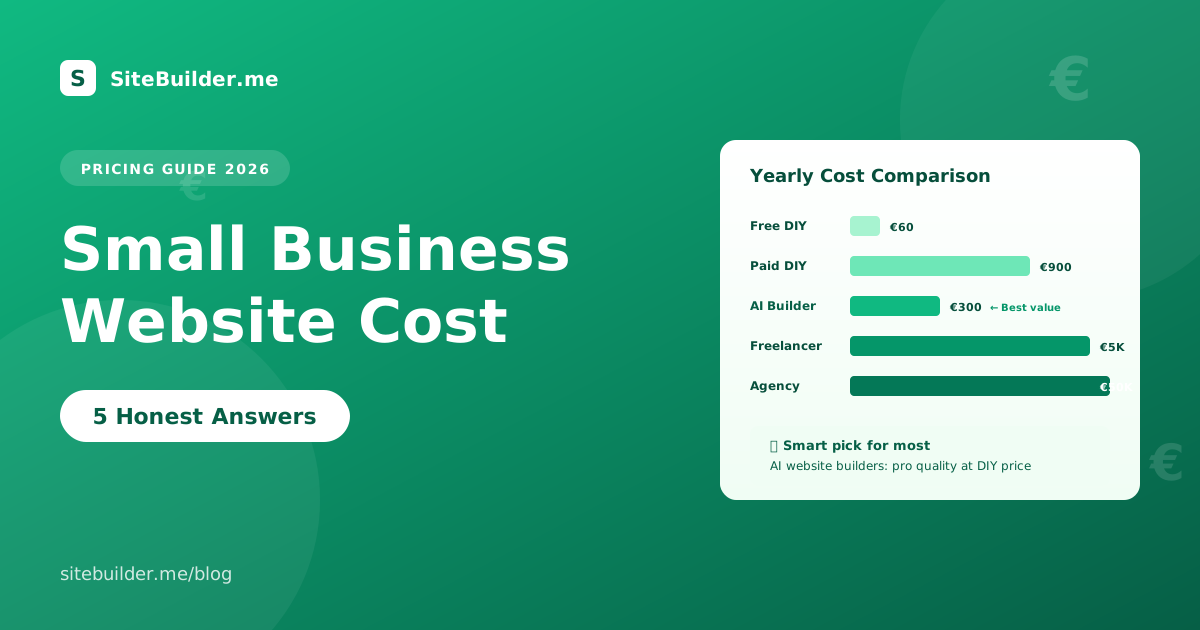
Expect to spend between 10 and 30 euros per month for an AI website builder that includes hosting, or 200 to 2,000 euros for a template site you build yourself. Agency-built websites typically cost 2,500 to 15,000 euros upfront.
Can I make a website for my small business for free?
Yes, several website builders offer free plans, though they usually come with the builder’s branding, ads or a subdomain like yourbusiness.builder.com. For a professional small business site, a paid plan with your own domain is worth the small monthly cost.
Do I need a website if I have a strong social media presence?
Yes. Social media pages are rented land. Algorithm changes, account bans or platform shutdowns can wipe out your reach overnight. A website is the only online asset you fully own.
Should I use WordPress or an AI website builder?
For most small business owners with no development background, an AI website builder saves weeks of work and produces a better-looking result. WordPress is more flexible for developers but requires plugins, hosting decisions and ongoing maintenance you may not want.
Ready to Build Your Small Business Website?
Now that you know exactly how to make a website for small business, the only step left is to start. Grab your business description, pick your primary goal and open an AI website builder. In one focused afternoon, you can have a beautiful, working website ready to bring in customers.
Try the SiteBuilder.me demo to see how AI can build your small business website in real time, or explore our plans to find the option that fits your budget.